Skip to content
Synafloat
Book a call
In a call we clarify whether the simulation answers your parameter question.

Simulation software for laser DED with wire or powder

We simulate the whole bead in one run.

The software models melt pool and bead layer by layer, with your geometry and your material. Because the melt consists of freely moving particles, the mesh-free method needs no computational mesh, which makes the simulations efficient.

With a computational meshRebuilding the mesh
With free particles (Synafloat)Layer 2 being deposited

A computational mesh that follows the part shape has to be adapted continuously to the changing geometry. The particles, by contrast, move with the material and so save computing time.

A computational mesh on the left, free particles on the right. While four layers are deposited, only the mesh on the left has to be adapted to the growing part; the particles follow the material.

The SPH particle method

SPH (smoothed particle hydrodynamics) represents the material with moving computational particles. Each particle carries temperature and phase, solid or liquid, and moves with the melt. Heat transfer, melt flow and the shape of the free surface follow from how the particles interact.

Schematic, illustration

Melt pool made of computational particlesSchematic side view: on the left, the solidified bead lies on the substrate. The melt pool joins it on the right, a cloud of computational particles, round at the front and with a long tail back toward the bead. At the rear edge the particles merge into the solidified bead, and the outer particles form the free surface. The tip of the laser cone meets the pool surface, and the wire dips into the pool from the upper right. One particle inside is highlighted. The labels are process input, particle state, free surface and geometry.Process inputFree surfaceGeometryParticle stateMelt pool made of computational particlesSchematic side view: on the left, the solidified bead lies on the substrate. The melt pool joins it on the right, a cloud of computational particles, round at the front and with a long tail back toward the bead. At the rear edge the particles merge into the solidified bead, and the outer particles form the free surface. The tip of the laser cone meets the pool surface, and the wire dips into the pool from the upper right. One particle inside is highlighted. The labels are process input, particle state, free surface and geometry.Process inputFree surfaceGeometryParticle stateMelt pool made of computational particlesSchematic side view: on the left, the solidified bead lies on the substrate. The melt pool joins it on the right, a cloud of computational particles, round at the front and with a long tail back toward the bead. At the rear edge the particles merge into the solidified bead, and the outer particles form the free surface. The tip of the laser cone meets the pool surface, and the wire dips into the pool from the upper right. One particle inside is highlighted. The labels are process input, particle state, free surface and geometry.Process inputFree surfaceGeometryParticle state
Process input
Laser and material feed set how much energy and mass enter the modeled region.
Particle state
Heat transfer and phase change update the state of each particle.
Free surface
Surface tension shapes the melt. At the contact line, wetting determines how far the melt spreads.
Geometry
Bead width, layer height and melt depth follow from the particle field.
Melt pool made of particles, schematic

Model quantities and limits

The model works at bead scale and simulates melt-pool flow and the geometry of the deposited bead. From these quantities the simulation computes the parameters along the toolpath that your CAM defines. Thermal history and distortion of the whole part belong to part-scale CAE.

Schematic, illustration

Cross-section of a deposited beadSchematic: the deposited bead sits as an arc on the substrate, and the dashed melt zone reaches into the material below. Lines without values show layer height, melt depth and bead width. A dot on the bead stands for the peak surface temperature.Peak surface temperatureLayer heightMelt depthBead widthCross-section of a deposited beadSchematic: the deposited bead sits as an arc on the substrate, and the dashed melt zone reaches into the material below. Lines without values show layer height, melt depth and bead width. A dot on the bead stands for the peak surface temperature.Peak surface temperatureLayer heightMelt depthBead widthCross-section of a deposited beadSchematic: the deposited bead sits as an arc on the substrate, and the dashed melt zone reaches into the material below. Lines without values show layer height, melt depth and bead width. A dot on the bead stands for the peak surface temperature.Peak surface temperatureLayer heightMelt depthBead widthCross-section of a deposited beadSchematic: the deposited bead sits as an arc on the substrate, and the dashed melt zone reaches into the material below. Lines without values show layer height, melt depth and bead width. A dot on the bead stands for the peak surface temperature.Peak surface temperatureLayer heightMelt depthBead width

The model computes

Bead width
how wide the deposited bead lies on the surface
Layer height
how high the bead stands above the surface
Melt depth
how deep the melt reaches into the material below
Peak surface temperature
how hot the melt pool gets at its surface
The model does not establish
Residual stress, part distortion, microstructure and process windows outside the matched range.
Bead cross-section, schematic

The model takes the beam profile as an input: Gaussian, ring, top-hat.
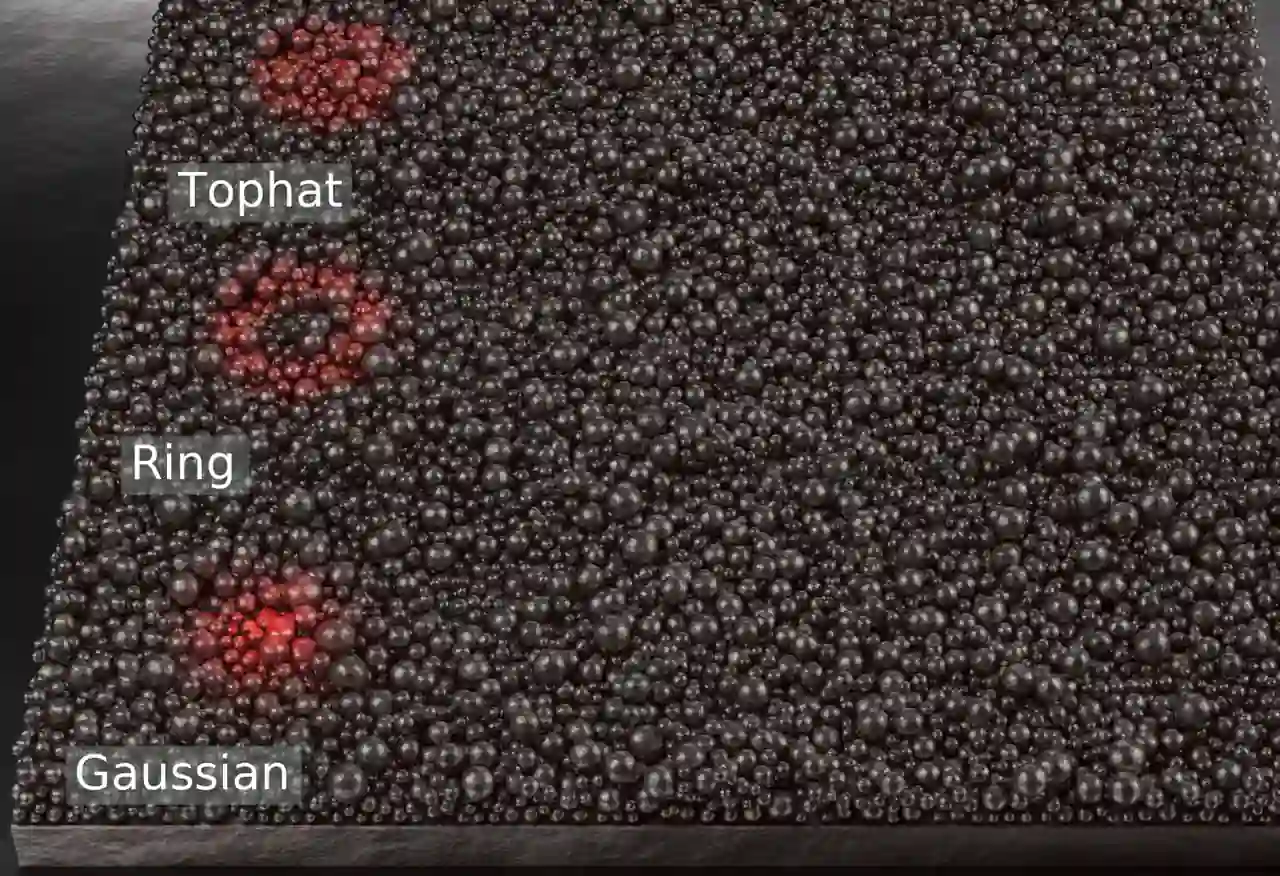
Three single tracks, three beam profiles: Gaussian, ring, top-hat.

Your team checks the adjusted machine file, runs the print and is responsible for the qualification of process and part.

Matching with experiments

The founder validated the model for pure titanium with single-track experiments in his doctoral thesis (2023).

In a pilot project we calibrate the model to your individual machine, for example with a cross-section. We adjust the model until simulated and experimental results agree as closely as possible.

Every comparison names the measurements we calibrated with.

From CPU cluster to GPU

Our GPU software is built on highly optimized CPU code. It spreads a simulation across many nodes of a compute cluster and scales almost linearly. We carried its data layout for fast memory access and its parallel structure over to GPUs; today we compute on GPUs only.

Measurement, compute cluster

Speed-up over the normalized core countMeasurement, both axes logarithmic: the normalized core count r horizontal, that is the number of cores divided by the cores of the smallest run, the speed-up over that run vertical. A dashed line shows ideal scaling. Filled dots show the measurement within one node, open dots the measurement across nodes. Within one node the speed-up reaches 7.4 at r = 8, then the shared memory bandwidth of the node slows it. Across nodes it reaches about 100 at r = 1024 and flattens beyond.10⁰10¹10²10³10⁰10¹10²10³Normalized core count rSpeed-up, relativeidealSpeed-up over the normalized core countMeasurement, both axes logarithmic: the normalized core count r horizontal, that is the number of cores divided by the cores of the smallest run, the speed-up over that run vertical. A dashed line shows ideal scaling. Filled dots show the measurement within one node, open dots the measurement across nodes. Within one node the speed-up reaches 7.4 at r = 8, then the shared memory bandwidth of the node slows it. Across nodes it reaches about 100 at r = 1024 and flattens beyond.10⁰10¹10²10³10⁰10¹10²10³Normalized core count rSpeed-up, relativeidealSpeed-up over the normalized core countMeasurement, both axes logarithmic: the normalized core count r horizontal, that is the number of cores divided by the cores of the smallest run, the speed-up over that run vertical. A dashed line shows ideal scaling. Filled dots show the measurement within one node, open dots the measurement across nodes. Within one node the speed-up reaches 7.4 at r = 8, then the shared memory bandwidth of the node slows it. Across nodes it reaches about 100 at r = 1024 and flattens beyond.10⁰10¹10²10³10⁰10¹10²10³Normalized core count rSpeed-up, relativeideal

Normalized core count r: the number of cores divided by the cores of the smallest run. r = 8 means eight times as many cores.

Within one node
almost ideal with few cores, then memory bandwidth slows it, because all cores of a node share the same memory and wait for data
Across nodes
each node brings its own memory, so almost linear again up to about five hundred times the cores of the smallest run, flatter beyond

Measured on a CPU cluster: AMD EPYC nodes with 128 cores, InfiniBand interconnect, November 2023

Measured 2023, CPU cluster: speed-up over the normalized core count

The simulation can be spread across many processor cores that compute at the same time. The speed-up states how much faster a run is than the smallest run. The normalized core count r states how many cores a run uses relative to the smallest run. If the curve lay on the diagonal, every doubling of the cores would halve the computing time. Across several nodes, meaning individual computers of the cluster, the curve runs almost parallel to this diagonal up to about r = 512. It flattens only beyond that. The speed-up therefore grows almost in proportion to the core count, but stays below the ideal value.

CPU code, optimized and scaled

Data layout and parallel structure carried over

GPU software, today

Sources

  1. Mesh and particlesSchematic, illustration: Synafloat method illustration.

    Shows the principle, mesh-based versus mesh-free. Not a computed result.

  2. Three beam profilesSimulation, demonstrator: three single tracks, three beam profiles.

    Supports the beam profile as an input of the model, not a comparison of the profiles.

  3. Speed-up over the normalized core countMeasurement, CPU cluster, November 2023: own measurement series.

    Supports the relative speed-up over the normalized core count.

  4. Supports the formulation of surface tension and wetting at free surfaces in SPH.

  5. Matching of the model for pure titanium with single-track experiments.

Technical articles

The articles go deeper into bead geometry and the choice of simulation method.

Let’s talk about your part

In a call we clarify whether the simulation answers your parameter question.

Book a call

You pick the slot on book.synafloat.com.

Enquiry via the contact form

You talk to Dr. Michael BlankThe founder has researched particle-based melt-pool simulation since 2017 and earned his doctorate in the field.


Funding

EXIST – from science to business
Funded by the EXIST Business Start-up Grant at the FAPS institute of FAU, funding period 09/2025 to 08/2026.
FAU – Friedrich-Alexander-Universität Erlangen-NürnbergFAPS – Institute for Factory Automation and Production Systems, FAU

Partner: Friedrich-Alexander-Universität Erlangen-Nürnberg (FAU). Synafloat is a spin-off of FAU.

ESA BIC Northern Germany

Incubated at the ESA Business Incubation Centre in Bremen since November 2026.